











Cloud environment එකක් build කරන විට authentication, policies සහ directory integration manage කිරීමට managed domain service එකක් තිබීම ඉතා ප්රයෝජනවත් වෙනවා. Azure infrastructure භාවිතා කරන organizations සඳහා Microsoft Entra Domain Services service එක Azure Virtual Machines සහ applications සඳහා domain-based authentication enable කරන solution එකක්.
මෙම practical guide එකෙන් අපි Microsoft Azure portal එක භාවිතා කර Entra Domain Services setup කරන step-by-step process එක බලමු.
1. Prerequisites
Setup process එක start කිරීමට පෙර environment එක තුළ requirements කිහිපයක් prepare කරලා තියෙන්න අවශ්යයි.
Azure Subscription
Azure services deploy කිරීම සඳහා active Azure subscription එකක් තිබිය යුතුය.
Microsoft Entra Tenant
Directory infrastructure එක manage කරන්න Microsoft Entra ID tenant එකක් අවශ්යයි.
Tenant එක තුළ: Users, Groups, Identity objects already configure කරලා තියෙනවා නම් deployment process එක පහසු වෙනවා.
Virtual Network (VNet)
Managed domain deploy කරන විට Azure virtual network එකක් අවශ්ය වෙනවා. මෙය domain controllers deploy වෙන network environment එක ලෙස ක්රියා කරනවා.
2. Step 1 – Enable Entra Domain Services
Entra Domain Services enable කිරීම Azure Portal interface එකෙන් easily perform කරන්න පුළුවන්.
Navigation Path
Azure Portal තුළ:
මෙහි “Create” option එක select කළ විට new managed domain deployment wizard එක open වෙනවා. මෙම wizard එක Entra Domain Services configuration process එක guide කරන interactive setup interface එකක්.
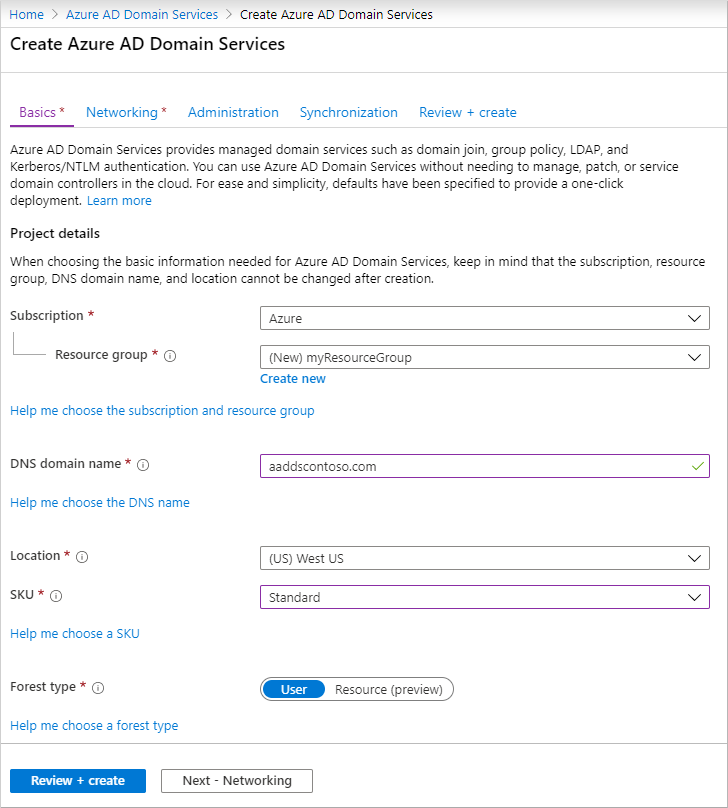
3. Step 2 – Configure Managed Domain
Deployment wizard එකේ next stage එක managed domain configuration එකයි. මෙහි configuration parameters කිහිපයක් define කරන්න වෙයි.
Domain Name
Managed domain එකට use කරන domain name define කරන්න අවශ්යයි.
Example:
මෙය Azure managed domain environment එක represent කරන DNS name එකයි.
Azure Region
Domain service deploy කරන Azure region select කරන්න අවශ්ය වෙනවා.
Region selection වලදී consider කරන්න පුළුවන් factors වෙන්නෙ application location, network latency සහ infrastructure proximity වගේ කරුණු. සාමාන්යයෙන් workloads deploy වෙන region එකම select කරන එක recommended.
SKU Selection
Entra Domain Services deployment සඳහා different performance tiers (SKU) available වෙනවා. Common options include:
- Standard
- Enterprise
Organization size සහ workload requirements අනුව suitable tier එක select කළ හැක.
4. Step 3 – Configure Networking
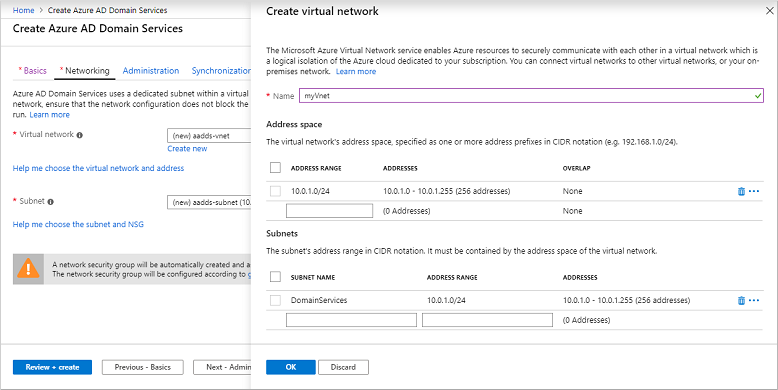
Managed domain properly work වෙන්න networking configuration important role එකක් play කරනවා.
Virtual Network Selection
Deployment wizard එකේදී managed domain connect වෙන Virtual Network select කරන්න වෙයි. මෙය domain controllers operate කරන network environment එකයි.
Subnet Configuration
Domain service deploy වෙන subnet specify කරන්න අවශ්යයි. Best practice එකක් ලෙස dedicated subnet එකක් domain services සඳහා reserve කිරීම recommend කරනවා.
Example:
මෙය network traffic isolate කරන්න සහ infrastructure management simplify කරන්න උපකාරී වෙනවා.
DNS Configuration
Managed domain deployment complete වුණ පසු Virtual Network DNS settings update කරන්න අවශ්ය වෙනවා.
DNS servers configuration:
- Entra Domain Services provided IP addresses
- Managed domain DNS resolution enable කරනවා.
මෙම step එක domain join operations සඳහා important.
5. Step 4 – Deploy Managed Domain
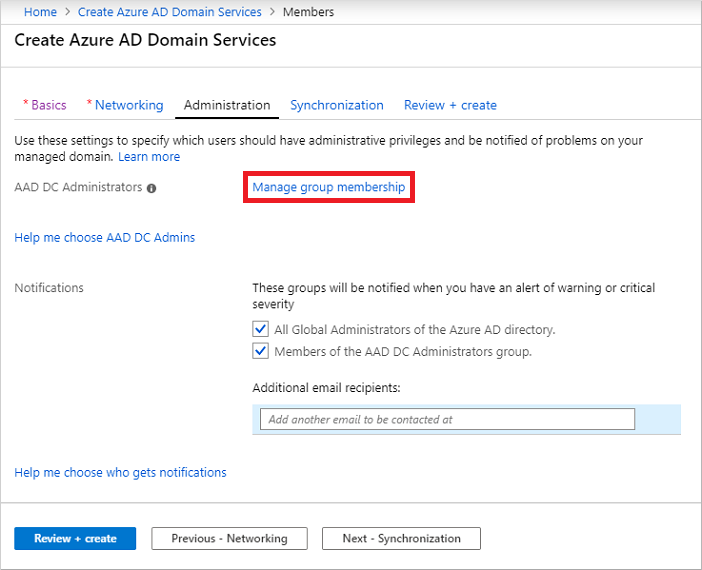
Configuration steps complete වුණ පසු deployment process start කළ හැක. Deployment start කිරීම සඳහා wizard එකේ Create button click කරන්න.
Azure platform එක හරහා managed domain infrastructure provision කරනවා, domain controllers deploy කරනවා සහ network configuration apply කරනවා.
Deployment process එක normally minutes කිහිපයක් සිට 30 minutes පමණ take වෙන්න පුළුවන්. Deployment progress Azure Portal dashboard තුළ monitor කරන්න පුළුවන්.
Deployment Process Overview
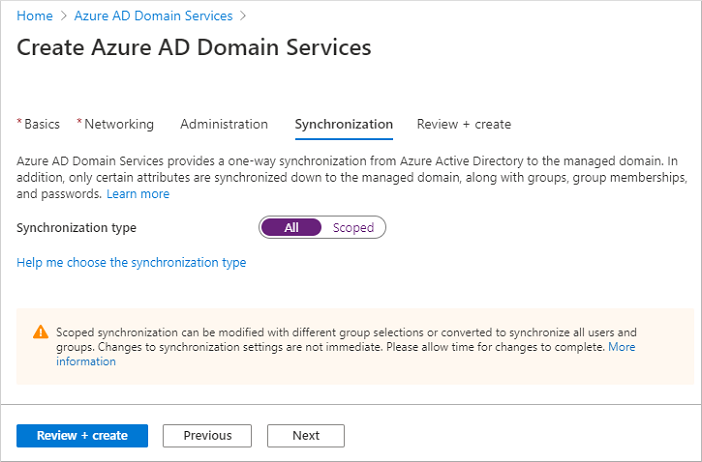
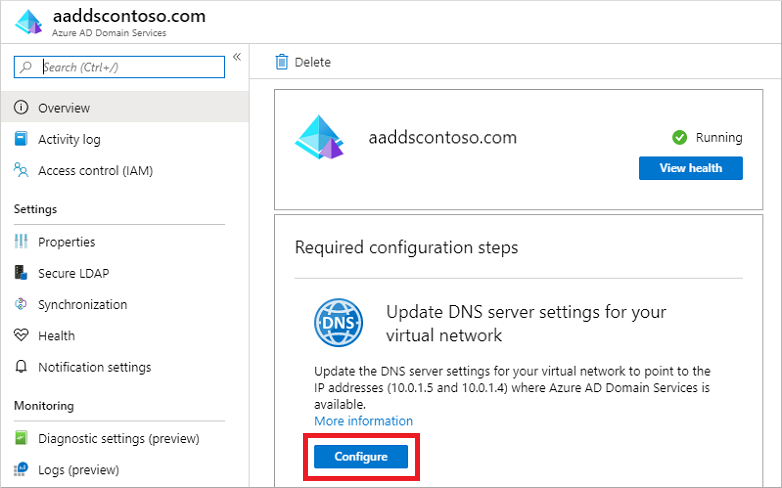
Deployment workflow simplified flow එක මෙහෙම represent කරන්න පුළුවන්.
Deployment complete කලාට පසු Azure Virtual Machines domain join කර applications authentication enable කරන්න පුළුවන්.