











Cloud infrastructure එකට migrate වෙන organizations බොහෝ වෙලාවට Active Directory dependent applications maintain කරන්න වෙලා තියෙනවා. ඒත් traditional domain controllers maintain කරන එක cloud environment එකක සරල වැඩක් නොවෙයි.
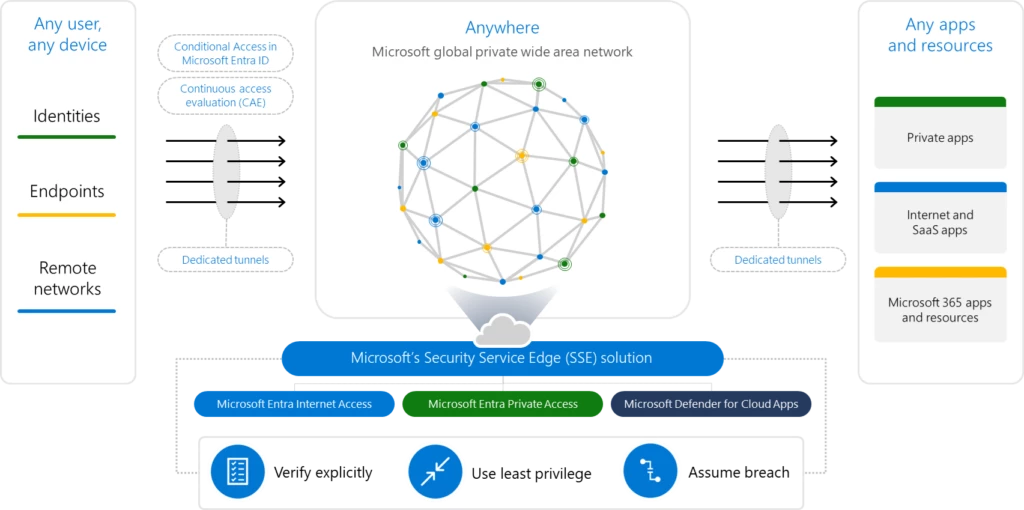
මෙම ගැටළුවට solution එකක් ලෙස Microsoft Entra Domain Services Azure තුළ fully managed domain environment එකක් provide කරනවා.
මෙම ලිපියෙන් අපි බලන්නේ Microsoft Entra Domain Services architecture එක කොහොමද ක්රියාත්මක වෙන්නේ කියලා.
1. Managed Domain Concept
Managed Domain කියන්නේ මොකක්ද?
Managed Domain කියන්නේ Microsoft manage කරන Active Directory compatible domain environment එකක්.
Organization එකට domain services භාවිතා කරන්න පුළුවන්. ඒත් domain controllers maintain කරන්න, patch කරන්න, backup කරන්න වගේ infrastructure tasks Microsoft විසින් handle කරනවා.
මෙය integrate වෙන්නේ Microsoft Entra ID identity platform එක සමඟ.
Microsoft-managed Domain Controllers
Traditional environment එකක domain controllers, organization එක තුල install කර manage කරනවා. නමුත් Entra Domain Services තුළ: Domain controller installation / Security updates / Patching / Backup / Monitoring වගේ මෙම සියලු operations, Microsoft විසින් manage කරනවා.
Automatic Domain Controller Deployment
Azure managed domain environment එක create කරන විට Microsoft Azure, automatically domain controllers දෙකක් deploy කරනවා.
මෙය High availability maintain කරන්න සහ Fault tolerance ensure කරන්න design කරලා තියෙන architecture එකක්. මෙම domain controllers user identity data store කරලා authentication services provide කරනවා.
2. Replica Sets

Large organizations සහ global workloads සඳහා high availability ඉතා වැදගත්. මෙහිදී Replica Sets concept එක භාවිතා වෙනවා.
Azure Region Based Deployment
Replica sets, multiple Azure regions තුළ deploy කරන්න පුළුවන්. මෙය regional failure එකක් ඇති වුනත් services continue වෙන්න help කරනවා.
High Availability
Replica sets deploy කිරීමෙන්:
- Multiple domain controller instances
- Regional redundancy
- Service continuity වගේ කරුණු පරිපාලනය වෙනවා.
Disaster Recovery
Disaster scenario එකක් ඇති වුන මොහොතක වූනත්, Authentication services continue වීම හා Applications downtime reduce වීම මෙහි තිබෙන තවත් විශේෂ ගුණාංගයක්.
ඒ නිසා enterprise workloads සඳහා Entra Domain Services, reliable architecture එකක් ලෙස අපි සලකනවා.
3. Synchronization Architecture
Microsoft Entra Domain Services architecture එකේ වැදගත්ම කොටසක් තමයි identity synchronization model. Identity data flow එක mainly components තුනක් අතර සිදු වෙනවා:
- On-premises Active Directory
- Microsoft Entra ID
- Entra Domain Services
Identity Synchronization Model
- Organization එකේ On-premises Active Directory users සහ groups store කරනවා.
- ඒ identity data Microsoft Entra ID වෙත synchronize වෙනවා.
- ඉන්පසු Entra ID තුළ තිබෙන identity information Entra Domain Services managed domain වෙත replicate වෙනවා.
මෙම synchronization model එක one-way synchronization model එකක්. ඒ කියන්නේ Entra ID → Domain Services direction එකට data replicate වෙනවා. Managed domain තුළ changes back sync වෙන්නේ නැහැ. මේක security සහ data consistency maintain කරන්න design කරලා තියෙන architecture එකක්.
4. Authentication Methods
Microsoft Entra Domain Services traditional Active Directory authentication protocols support කරනවා. මෙය legacy applications run කරන්න ඉතා වැදගත් feature එකක්.
LDAP Authentication
Applications වලට directory data query කරන්න LDAP (Lightweight Directory Access Protocol) භාවිතා කරන්න පුළුවන්.
Kerberos Authentication
Kerberos protocol එක enterprise environments තුළ secure authentication mechanism එකක්.
- Ticket-based authentication
- Secure network authentication features provide කරනවා.
NTLM Authentication
Legacy systems බොහෝ වෙලාවට NTLM authentication භාවිතා කරනවා.
Entra Domain Services මේ protocol එකත් support කරන නිසා older applications modify නොකරම run කරන්න පුළුවන්.
Secure LDAP (LDAPS)
Security enhance කරන්න Secure LDAP (LDAPS) support කරනවා.
මෙය:
- Encrypted LDAP connections
- Secure directory communication provide කරනවා
මීලග ලිපියෙන් අපි කතා කරමු AD සහ මේ Entra Domain Service එකේ ප්රධාන වෙනස්කම් මොනවාද කියලා.