







සිං
En
CLOSE
  • Home
  • News
  • Devices
    • IoT
    • Hololens
    • Mobile Phones
      • Accessories
    • Surface
    • Xbox
    • Other
  • Apps
    • Windows 10
    • Windows Phone Apps
    • Windows Store Apps
  • Games
    • PC
    • PlayStation
    • Windows 8
    • Windows Phone
    • Xbox
  • Podcast
  • Live
  • Our Team
  • Contact Us
windowsgeek logo
windowsgeek logo
  • Home
  • News
    • Microsoft සමාගම LinkedIn ඩොලර් බිලියන 26.2 කට පවරා ගනියි.

      OneDrive 15GB අවකාශය ජනවාරි 31 ට පසුවත් භාවිතා කරන්නට අවස්ථාවක් !!

      Azure Fundamentals (Azure මූලිකාංග )- 1 කොටස

      Microsoft teams වැඩි දියුණු කරමින් AppSource වෙත එක් කරන SharePoint Framework 1.11

      Microsoft Teams windows/office channel වෙත මාරු වීමට සැරසෙයි

  • Devices
    • IoT
    • Hololens
    • Mobile Phones
      • Accessories
    • Surface
    • Xbox
    • Other
  • Apps
    • Windows 10
      • Wallpapers විදියට භාවිත කිරීමට Windows Spotlight lockscreen images සුරකින්නේ මෙහෙමයි.

        Windows 10 පරිගණකයේ sleep option එකෙන් හරියට වැඩ ගනිමු.

        මොනවද මේ IoT ?

        ඔයාගේ PC එකටත් fingerprint lock එකක් දාගමුද?

        Windows 10 mobile හි අවසානය මේ දෙසැම්බරයේ..!

    • Windows Phone Apps
    • Windows Store Apps
  • Games
    • PC
    • PlayStation
    • Windows 8
    • Windows Phone
    • Xbox
  • Podcast
  • Live
  • Our Team
  • Contact Us
Home Devices Fingerprint Reader තාක්ෂණය සමඟ මුසුවූ Microsoft හි නවතම හඳුන්වාදීම
  • Devices
  • Microsoft
  • Windows 10

Fingerprint Reader තාක්ෂණය සමඟ මුසුවූ Microsoft හි නවතම හඳුන්වාදීම

By Gayani Rupasinghe -
Sep 11, 2017
3081
0
SHARE
Facebook
Twitter

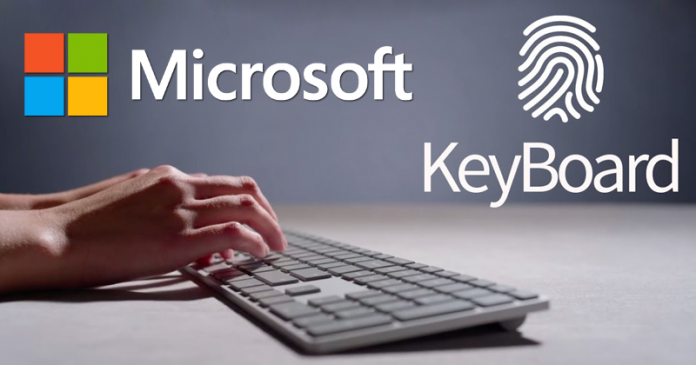
පරිගණකයට log වෙන සෑම වතාවකදීම password එක type කරන්න වෙන එක ඔබටත් කරදරයක්ද? එහෙනම් එයට හොඳම විසඳුම තමයි Microsoft සමාගම විසින් හඳුන්වා දුන් “සැඟවුණු” fingerprint sensor එකක් සහිත modern keyboard එක. මෙයට පෙර හඳුන්වා දුන් surface keyboard එකත් සමඟ බැලූ බැල්මට සමානකමක් තිබුණත්, කලින් දකින්නට නොලැබුණු විශේෂතා කීපයක් මෙහි ඇතුළත්.
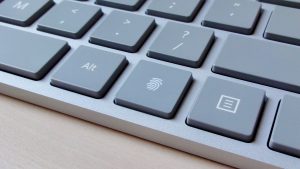
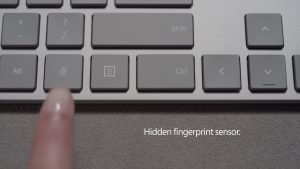
ඉන් ප්‍රධාන වෙන්නෙ, දකුණු පස තියෙන windows key එක වෙනුවට අළුතින් යොදාගෙන තියෙන fingerprint key එක. ඇත්ත වශයෙන්ම කියනවනම් fingerprint key එක කියන්නෙ button එකක්. එමනිසා ඔබගේ ඇඟිලි සලකුණු කියවීමට නම් එම key එක press කිරීම කළ යුතුයි. 2015 වසරේදී හඳුන්වා දුන් Microsoftහි biometric sign-in feature එක වන Windows Hello සමඟ මෙහි fingerprint sensor එක ක්‍රියාත්මක වෙනවා. මේ නිසා ඔබට ඉතා පහසුවෙන් ඔබෙ පරිගණකය unlock කරගන්න පුළුවන්. වෙනත් විදිහකට කියනවා නම් ඔබේ පරිගණකයේ password එක වෙන්නෙ ඔබමයි.
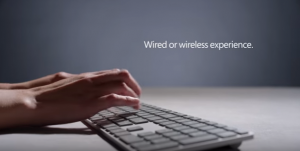
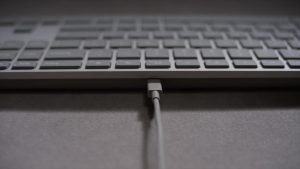
මෙම keyboard එකෙහි තවත් විශේෂත්වයක් තමයි, ඔබේ අවශ්‍යතාවය අනුව wired හෝ wireless යන දෙ ආකාරයටම භාවිතා කිරීමට හැකිවීම. මෙයට micro-USB cable එකක් හෝ Bluetooth හරහා ඔබේ පරිගණකය සමඟ connect වීමට හැකියාව තියෙනවා.මීට පෙර වෙළඳපොලට පැමිණි surface keyboard එකෙහි මෙම පහසුකම දක්නට ලැබුණෙ නැහැ.
නමුත් මෙම modern keyboard එකෙහි battery ආයු කාලය නම් surface keyboard එකට සාපේක්ෂව ඉතා අඩුයි. surface keyboard එකෙහි බැටරියට වසරක පමණ ආයු කාලයක් තිබුණත් මෙම modern keyboard හි බැටරි ආයු කාලය මාස 4ක් බවයි Microsoft සමාගම සඳහන් කරන්නේ. එයට හේතුව තමයි මෙහි යොදාගෙන තිබෙන fingerprint sensor එක. එසේ වුණත් මෙහි පවතින අනෙක් වාසිය තමයි ආයු කාලය අඩු වුනත් එය rechargeable battery එකක් වීම.

ඔබ මතක තබා ගත යුතු තවත් වැදගත් දෙයක් තියෙනවා. ඒ තමයි මෙම modern keyboard එක ක්‍රියා කරන්නේ Windows 10 සමඟ පමණක් බව. Surface keyboard එක Windows 10/8.1/8, Android 4.4.2-5.0 සහ Mac OS 10.10.5/10.11.1 සමඟ ක්‍රියා කිරීමට හැකි වුණා. Microsoft සමාගමට අනුව modern keyboard හි Bluetooth implementation එක compatible වෙන්නේ Windows 10 සමඟ පමණක් වීමයි මෙයට හේතුව.
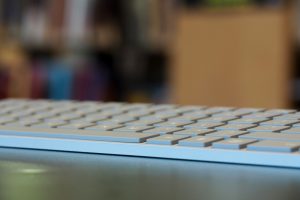
ඔවුන් මෙම Fingerprint ID සහිත modern keyboard එක $129.99 ක මුදලකට වෙළඳපොළට නිකුත් කරලයි තියෙන්නේ. මෙම keyboard එකෙහි ඇති ආකර්ශණීය නිමාවත්, මෙයින් ලබා දෙන ඉහලම typing අත්දැකීමත්, යොදාගෙන තිබෙන නවීන biometric security එකත් නිසා බොහෝ දෙනා පවසන්නේ අප වැය කරන මුදලට මෙය ඉතා වටිනා බවයි.

Source:https://www.neowin.net/news/microsofts-new-modern-keyboard-with-fingerprint-id-is-now-available-in-the-us-for-12999

  • TAGS
  • biometric sign-in feature
  • fingerprint key
  • modern keyboard
  • surface keyboard
SHARE
Facebook
Twitter
  • tweet
Previous articleWindows Insidersලාට දැන් Office 365 අත්විඳීමේ අවස්ථාව
Next articleFingerprint sensor එක දැන් Display එකට
Gayani Rupasinghe

RELATED ARTICLESMORE FROM AUTHOR

Microsoft Data Analytics – Power BI (Part 02)

Microsoft Data Analytics – Power BI (Part 01)

Azure Architecture එක සරළව ඉගෙන ගමු – (Part 03) (Cost Optimization)

EVEN MORE NEWS

Azure AI Bot Framework – Microsoft AI Pro කෙනෙක් වෙන්න –...

Oct 26, 2025

Microsoft Data Analytics – Power BI (Part 02)

Jul 17, 2025

Microsoft Data Analytics – Power BI (Part 01)

Jul 17, 2025

POPULAR CATEGORY

  • News360
  • Windows 10224
  • Apps195
  • Microsoft143
  • Windows 10 Mobile104
  • Devices103
© XiCigny (PVT) LTD 2015 All Rights Received.